
Blog

November 15th, 2010

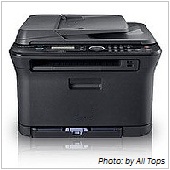
black printerHaving a device that just prints out paper won’t cut it anymore - today’s printing needs involve much more. Taking care of several needs in a single device is convenient and cost effective, and saves space too.

These days, printers have become more than just, well, printers. There are many additional features and factors to consider for your purchase, as well as its use, to be as cost effective as possible.

Multi-functionality is one of the most important factors you should consider when buying a printer. With technology moving in leaps and bounds, having a device that just prints out paper won’t cut it anymore. Today’s printers have multiple functions, which make them more versatile. Look for features such as a built in scanner (preferably capable of multiple page scanning), as well as fax and copy options. It’s much more convenient to have everything in a single device, and it saves space too.

Another factor to consider is how economical your printer will be to use. One feature that helps reduce costs is called duplex printing, which allows you to print on both sides of the page - saving on paper costs and making your operations much more environment friendly. Make sure that your printer has the option of setting duplex printing as its default mode.

Another way to save is by determining which type of printer you need - laser or inkjet. Inkjet printers print slower, but are cheaper to purchase and use. Laser printers print faster and offer better quality output, but are much more expensive to purchase, and the ink cartridges cost a lot more, too. So before buying a printer, it’s essential to determine how you’ll use it first.

Also make sure that your printer has the option to print draft and black-only copies for not-so-important documents. When you don’t need professional quality or color prints you should have the option to enable lower quality printing, which will save on ink costs.

You should also look into network printing, which lets multiple users print from a single printer. This enables you to monitor ink and paper usage better, and also eliminates the need for multiple printers in the office, saving on purchase, operation, and maintenance costs. An LCD on your printer will also help you diagnose and troubleshoot problems, as well as preview documents that are printing or in the cue.

If you are looking for help in buying a new printer for your office, or want to organize your existing printing system to save on costs, please feel free to give us a call so we can discuss options that will meet your particular needs.

Published with permission from TechAdvisory.org. Source.
Topic Articles
November 12th, 2010

hacker typing on keyboardPatching and updating the programs that you use, as well as removing old or unused programs, can go a long way in ensuring that your system is safe from malware attacks.
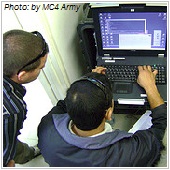
One of the more subtle ways hackers use to get malware into your system is through exploiting programs that are either old or not up to date.

Naturally, most programs are not perfect when they first come out, and hackers are always out to exploit weaknesses in the design and infrastructure of these programs. This is why developers constantly send patches and updates to their clients and subscribers.

Programs that do not have these patches and updates that fix vulnerabilities in the system are very viable entry points through which malware can enter your system. Also, older programs on your system might be phased out, which means the developer is not releasing patches or fixes for them anymore.

This is why it is essential that your programs be up to date, especially with the latest security patches that plug up holes in the system. And if there are programs that are beyond their expiration date or aren’t being used any longer, it’s a waste of space and resources to keep them installed in your computers. It’s important that you regularly check the status of your programs to make sure that they’re always in tip-top shape.

If you’d like to ensure that the programs you use are always patched, updated, and safe, please contact us so we can sit down with you and develop a customized security system that meets your specific needs.

Published with permission from TechAdvisory.org. Source.
Topic Articles
November 11th, 2010

IT support working with computerA Business Community Plan allows your business to resume normal operations after experiencing data loss or equipment failure resulting from minor problems to major disasters.

You’ve probably heard news about companies that have experienced data loss. You may think that these losses can only happen to larger companies because of the huge databases they have. However, small to medium-sized businesses are not safe from data loss, either. Unfortunately, according to recently conducted studies, around 50% of small to midsized businesses are at risk, because they have no Business Continuity Plan (BCP) in place.

What is a Business Continuity Plan? It’s a comprehensive plan that enables your business to resume normal operations after a significant data loss or network downtime due to natural disasters, sabotage or theft, or equipment failure.

Maybe you already have a Business Continuity Plan for your company. Even so, you need to make sure that your plan is flexible and scalable, and can adapt to the natural changes that your business undergoes.

Software and hardware installations, updates, and modifications are an important part of business continuity planning. Your data should be properly and regularly backed up, and you need storage and recovery systems and procedures that are continually updated with changes that constantly occur in your IT. If your computer software and hardware are not properly maintained and procedures are not updated, this may lead to backup errors that will result to costly data losses. Unfortunately, companies routinely suffer significant data loss because they discovered the errors too late – usually while trying to recover the data.

In addition to having a flexible and scalable BCP, you also need a highly skilled IT staff that is up to speed on the importance of backup and recovery of data. It’s important that this staff is properly trained to implement your BCP in the event that your business experiences a major data loss.

Your business is important to you – and to us, too. We’re here to help you create or fine-tune a Business Continuity Plan that is best suited to your unique business needs, as well as prepare and assist your staff in implementing the plan should it become necessary. Contact us for more details.

Published with permission from TechAdvisory.org. Source.
Topic Articles
November 8th, 2010

twitterTwitter can be a powerful tool for business if used properly, but how? Experts list a few tips to help you utilize this social networking website to boost your online presence.

It’s common knowledge these days that social networking websites such as the hugely popular Twitter can be used not only as an online socializing medium, but also as a powerful business tool. However, not everyone becomes as successful as they want to. Here are a few tips experts recommend you follow when using Twitter:

  • Pick who you follow. Many people think that Twitter is all about getting as many followers as possible and following as many people as possible. However, while it’s true that Twitter numbers can be powerful, it’s also important to remember that the quality of the Tweets you follow also counts for a lot.
  • Plan ahead. Make things short and sweet. If you make it a habit of Tweeting at exactly 140 characters, you might want to rethink that. In case some of your followers decide to re-Tweet you, characters at the end of the Tweet will be lopped off to make room for “RT (insert Twitter username here)”. So if you have valuable information at the end of Tweet like a link for example, it becomes incomplete.
  • Tweet at peak times. Try to determine the time when you have the biggest number of people viewing you. That way, you can get your message across much more effectively to as much people as possible.

If you want to know more about maximizing your Twitter account for your business, please contact us and we’ll be happy to assist you.

Published with permission from TechAdvisory.org. Source.
Topic Articles
November 5th, 2010

key unlocking the doorPasswords are more or less the equivalent of keys when it comes to cyberspace. However, passwords can be compromised through hacking, stealing, or even just guessing which is why password security and integrity is very important.

In the same way that keys are used to open different doors, passwords are used to access many areas of cyberspace. However, those passwords are vulnerable to hacking, stealing, or random guessing – which makes password integrity and security a main concern.

However, for many people, this essential fact is overlooked. Many tend to use either easy-to-guess passwords, or use the same password for all their online accounts - from their online banking to their email – which is a hacker’s dream come true. Because when they steal a password, it’s standard operating procedure for them to test it against popular websites to see if it works there as well.

The most basic security measure you can use to guard against this is to have multiple passwords for your different online accounts – whether they are for personal or business use. And don’t just think of easy passwords, like your birthday or wedding anniversary – these are usually the first thing hackers try. The best passwords are alphanumeric – composed of both letters and numbers so that it’s harder to crack.

This might be a bit tedious, but it’s better than running the risk of compromising your security online. There are also several programs and applications you can use to help store your passwords, so you only need to remember a few of your most-used ones, and refer to your database for the others.

Remember, your passwords hold the keys to most, if not all, of your online presence, so keeping them secure is extremely important. If you’re looking for a security solution for your passwords, please give us a call so we can help you implement a password security system that works for you.

Published with permission from TechAdvisory.org. Source.
Topic Articles
November 4th, 2010

tech support checking and monitoring computerYou can avoid computer problems with Managed IT Services. IT professionals will conduct a comprehensive analysis of your IT processes and functions and help you assess how to produce the most favorable results for your business.

Today’s businesses rely heavily on computers. That’s why most entrepreneurs invest in the best computer hardware and software that their money can buy. Because of this, they expect everything to run smoothly and all their IT needs to be met with the use of these wonderful computers.

In reality, however, you wind up experiencing a weak internet signal, your web browser won’t load, or you can’t get your email running. All these occurrences cost you valuable time – time you can’t afford to lose.

You can avoid these incidents by using Managed IT Services. Our professionals will conduct a comprehensive analysis of all your existing IT processes and functions. We will gather facts from what you have experienced with your systems, and assess which have been proven to run efficiently and produce the most favorable results for your company. This will all be clearly documented as part of your overall business practices.

As the documentation progresses, you may find out that your IT environment is not as efficient as you thought it was. You may also discover specific needs that you were unaware of. If these needs aren’t addressed, they could negatively affect productivity and result in a decline in revenue. In fact, they could even lead to expensive IT network emergencies if you don’t have the right technology and proper maintenance on hand.

We understand these risks and challenges, and we’re here to assist you in assessing your needs through this documentation process. We can help you identify the right IT solutions that are best for your business, as well as provide solutions, including outsourcing certain network functions such as email, backup and recovery, and security. We’ll also help you maintain your IT network while making sure that all your systems are updated and running smoothly so that you can avoid system failure or downtime.

Give us a call today to learn how we can help you get the most out of your IT investments.

Published with permission from TechAdvisory.org. Source.
Topic Articles
November 1st, 2010

smartphone with open bookAs businesses and business people store more and more important information in their smartphones, the smart thing to do is to have a plan in place in case you lose it - having your smartphone’s data in the wrong hands can be a potential nightmare.

A few years ago, mobile phones were basically just a status symbol, a luxury people could do without. But today, they’ve become more than mere tools that make communication easier, and it’s almost unheard of to not have a one. They’re so common that it’s now considered a necessity, and many people cannot leave home without it.

Mobile phones have also evolved through the years to cater to the needs of their users, offering a bevy of features from digital camera integration to music and video playback and a lot more. Naturally, these features also extend to those who would like a more mobile approach to business - hence the smartphone. So to lose a smartphone these days means a lot more than just losing the hardware and “fun stuff” - it can spell a potentially dangerous threat to your business if the wrong person with the right skills picks it up.

Fortunately, technology also offers a way to counter lost smartphone incidents. Security experts recommend that businesses install smartphone applications that are capable of wiping your smartphone’s data, as well as triangulating your smartphone’s location.

“Most consumers could probably care less about this, but it’s incredibly important for businesses to have a remote wipe feature in place for its employees’ phones,” says Ken Dulaney, vice president for mobile computing of Gartner, a research and consulting firm based in Stamford, Connecticut.

Through these applications, a small packet of data is sent to your smartphone that is designed to delete all the information and data inside, and through GPS and / or cellular triangulation, direct you to its location. This makes it possible to protect your data and possibly get your phone back at the same time.

Regardless of the handset (and the corresponding OS) you are using, there are different apps that will do the job - so if you are looking to secure your business smartphones, please don’t hesitate to contact us so we can draw up a customized mobile security policy for you.

Published with permission from TechAdvisory.org. Source.
Topic Articles
October 28th, 2010

cloud over clear lakeWithout us knowing, we may visit websites that aren’t exactly healthy for our systems - inviting malware, phishing, and all types of potentially unsavory viruses that can damage our systems. The solution is simple: Clear Cloud
It’s a simple, straightforward approach to getting better security for your computer:  download software, install it, and have it check whether every single website you go to is safe or not.

That, in a nutshell, is what Clear Cloud does. This nifty little program is designed to help you filter out and block potentially harmful websites that many people unwittingly stumble into time and again. It’s the perfect solution for anti-phishing and helping keep your system free of malware - at least from stray clicking. While not a replacement for up-to-date anti-virus and other security software, it is an additional tool at your disposal.

And yes, Clear Cloud checks every single website you visit. How? Since Clear Cloud belongs to the DNS network, it has access to every website in the world. This enables Clear Cloud to check every website you access or try to access. If the website is clean, Clear Cloud allows you to access the website. On the other hand, if the website proves to be suspicious, then Clear Cloud blocks the website. And if you’re concerned that this may take a toll on your bandwidth, think again - Clear Cloud operates and finishes each task in literally the blink of an eye.

If you want to know how you can use Clear Cloud or other tools to keep your systems safe, please don’t hesitate to give us a call and we’ll be more than happy to discuss a custom security policy with you.

Published with permission from TechAdvisory.org. Source.
Topic Articles
October 25th, 2010

window xp to 7 logoMicrosoft recommends transferring to Windows 7 as Microsoft XP ceased sales on October 22, 2010, with support available only until April 2014.
If you’ve been using Microsoft XP for a long time – with good reason, XP being one of the most stable operating systems in the Windows line – it might be time to finally migrate over to the new Windows 7.

Microsoft has recently ceased sales for the popular OS – the last day to purchase XP was October 22, 2010. The software giant is now dedicating most of its resources and efforts to its latest OS, Windows 7. While XP support will continue until April 2014, that’s less than four years from now, and Microsoft is recommending users switch to Windows 7.

As for compatibility issues, Microsoft assures users that most programs that work with XP also work on Windows 7. “Windows 7 is designed to be compatible with the most popular hardware and software products you use every day. Thousands of these will work just fine,” reads a FAQ entry on their website. There is also the Windows 7 Compatibility Center, where you can check programs to ensure they will work on the new Microsoft OS.

If you are thinking of switching to Windows 7, please don’t hesitate to give us a call. We’ll be happy to discuss a customized plan for your business’s smooth transition to Microsoft’s latest OS.

Published with permission from TechAdvisory.org. Source.
Topic Articles
October 22nd, 2010

warning you're in dangerSince MS Word and Adobe Reader are widely used applications, hackers and malware designers have come up with ways to exploit these programs and the documents associated with them in order to infect as many people possible.

It might be common knowledge that Microsoft Word and Adobe Reader are probably the most used document editing /viewing applications out there, but here’s something you might not know: documents and PDF files can be used to introduce viruses and malware into your system.

Unfortunately for MS Word and Adobe Acrobat Reader, security experts aren’t too happy about how (not) secure these programs really are. Since they’re so widely used, hackers and malware designers have come up with ways to exploit these programs and the documents associated with them in order to hit as many people possible.

As a security measure, consider opening document and PDF files in alternative programs, such as Open Office for MS Office documents, and Foxit Reader or PDF Studio for PDF files. Even if you feel uncomfortable using these programs to create and edit your everyday documents, at least consider using them to open suspicious documents.

As for attachments that come with emails, try opening a suspicious file with Gmail. Send suspicious documents to a Gmail account and open it from there - Google Mail runs a virus check on it, and if it passes, open it on Google Docs to see what’s inside. You can also submit suspicious files to an online virus checker such as Virustotal, which will run it through a series of antivirus scanners to see if any red flags pop up.

It’s a bit of extra effort, true, but it beats having to deal with a full-fledged virus attack on your system. If you want to make sure that you have all the options available to secure your system, please don’t hesitate to contact us and we’ll be happy to sit down with you and discuss security policies that fit your needs.

Published with permission from TechAdvisory.org. Source.
Topic Articles